Close Menu
    Facebook X (Twitter) Instagram
    FH Edits
    • Tools
      • Dare Quiz
      • Free QR Code Generator
    • News
      • English
        • Cinema
        • Trends
        • Sports
      • Tamil
        • Cinema
        • Sports
        • Trends
    • Blog
    • Jokes & Memes
    • NCS Music
    • How To
    • Privacy Policy
    Facebook X (Twitter) Instagram
    FH Edits
    Uncategorized

    Google Drive Direct Link Generator and Step by Step Instruction

    makeflow.mks@gmail.comBy [email protected]04/02/2021Updated:15/02/2021No Comments1 Min Read
    googledrive share 1


    How to Get Google Drive Sharing URL

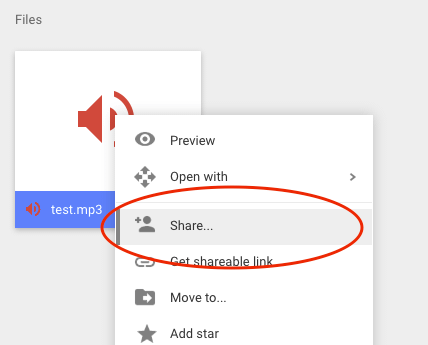
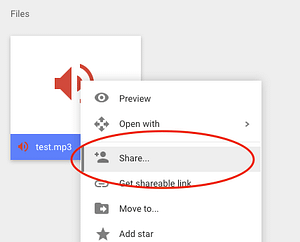
    1. Upload your audio/video file to Google Drive, then right click on the media file in Google Drive and select the menu item Share
    googledrive share 1

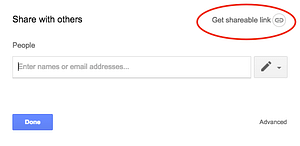
    2. Click the Get Sharable link

    googledrive sharelink 1

    3. Click the “can view” arrow then select More from the drop down list
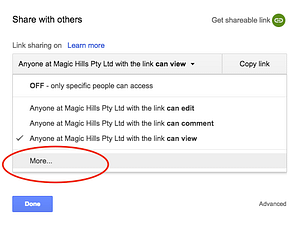
    googledrive sharelinkimore 1

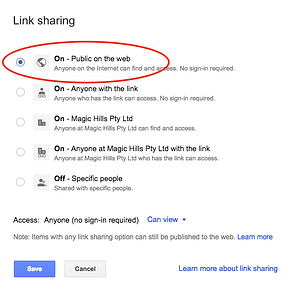
    4. Select On – Public on the web

    googledrive sharepublic 1

    5. Click the button Copy Link, then click Done. The copied link is the Google Drive sharing URL of the file.
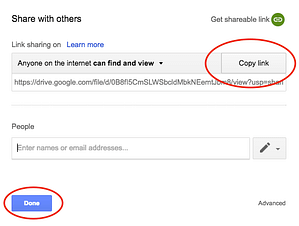
    googledrive copylink 1

    6. Use the Google Drive direct link generator tool to convert the URL to Google Drive Direct

    [email protected]
    • Website

    Related Posts

    How AR and VR Are Reshaping eCommerce Operations

    28/07/2022
    Leave A Reply Cancel Reply

    Recent Posts
    • Win a Free Spot in Modern WordPress Fast Track
    • Optimole Review – I Actually Tried It. Here’s What It Did to My Images
    • Masteriyo Joins Themeisle — A New Era for WordPress Course Creation 🚀
    • #166 – Ryan Welcher on What’s New for Developers
    • #164 – Milana Cap on the Interactivity and HTML APIs, and Their Enormous Potential
    Recent Comments
    • NCS Non Copyright Songs #FH​ Edits - Flowing Happiness on NCS Songs 600+ Download
    © 2026 fhedits.in. Designed by FhEdits.

    Type above and press Enter to search. Press Esc to cancel.